Hiboutik
Last updated: August 8, 2025
PREREQUISITE
You need to preconfigure your user rights and find your API informations by doing the preparation steps 1 and 2 described below.
Be a Hiboutik "Premium" client.
(Warning: Hiboutik does not allow data retrieval via the API for dates prior to the subscription period)
PREPARATION
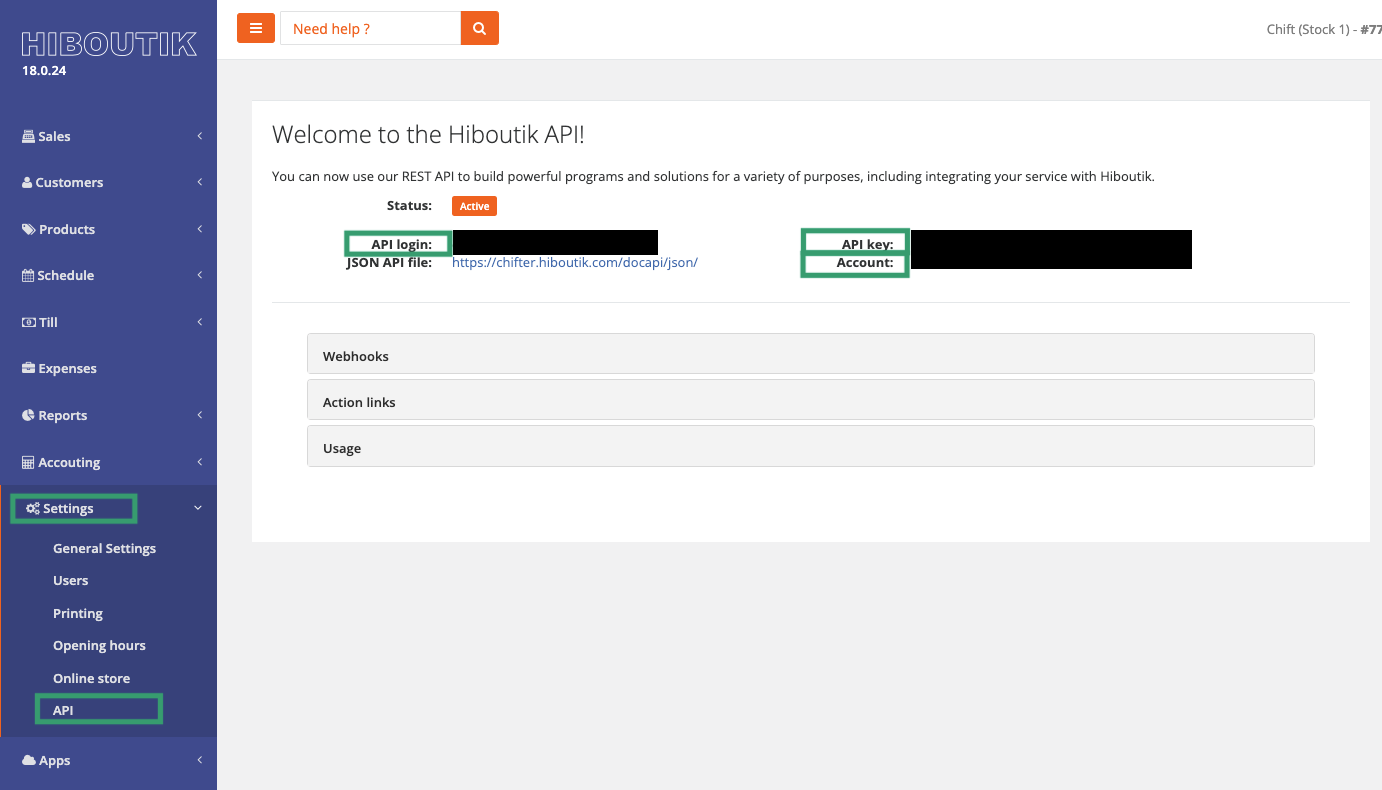
Find your client API informations:
API login
API Key
Account
Go to your Hiboutik account, on the left side menu, find: Parameters → API.
2. Configure your account permissions (the user account corresponding to the API login email)
You can find the permissions of the users by going to the tab Settings > Users > Access management and by checking the permissions of the user that you are going to use to create the connexion.
To be able to create the connexion to your Hiboutik account, the account that you are going to use needs to have the following permissions:
1. Sales Tab
35. Show pending sales
37. Show validated sales
99. Customers Tab
120. Products Tab
176. Syntheses Tab and all sub permissions enables
186. Show summaries: monthly, annual, customers, stock and others
189. Onglet Paramètres
200. Manage point of sale identification
202. Manage VAT rates
CONNEXION
Step 1: Choose a name for your connexion.

Step 2: Enter your account name, which you previously found on Hiboutik.

Step 3: Enter your API login, which you previously found on your Hiboutik.

Step 4: Enter your API key, which you previously found on your Hiboutik API page

Step 5: Click "Connect" to finalise the connexion.
CONFIGURATION
Step 1: Select your point of sale.

Step 2: Click "Submit" to complete the configuration.